

WORKFORCE GAMIFICATION
At AB-InBev, I worked with their BEES platform to deliver on various features of their B2B e-commerce experience. I also worked with their Force app which is used by traveling Business Development Representatives to plan their day and view their progress. I was part of a gamification initiative meant to focus the BDRs' attention on the most important tasks and metrics, and provide a window into their progress and earned incentives (while also making it somewhat fun).
Working together with UX Researchers, I measured the BDRs expectations, wants and pain points. The main problem seemed to be that while the workers had a sense of progression for their tasks and variable compensation, they had no way of seeing how completing their goals directly affect them. If they could see this, they felt they could perform better by keeping up what they were doing well, while putting extra effort into areas they needed work on.
The two new features developed were Coins and the Variable Compensation Wallet. Coins are company credits earned by completing tasks, which the BDR can trade in for prizes at the end of the month. The goal for the Variable Compensation Wallet was to show the BDR's earnings progress on their variable income, which is based on various aspects of their work performance.
The Old BDR Profile
The old version of BDR profile was basically a list of links the BDR could use to view various metrics connected their performance. While somewhat useful, it lacked ways of seeing how these number related to their individual success, and provided few clues as to what was most important for them to focus on in their work.

Coins: Research and Wireframing
Given that this was both gamification and an "account" of sorts, banking apps and mobile games were used as reference for the design. The design needed to show total earned coins, potential coins that can be earned each day, coins that could be earned throughout the month, and the BDR's highest performing workday (called a "power day").
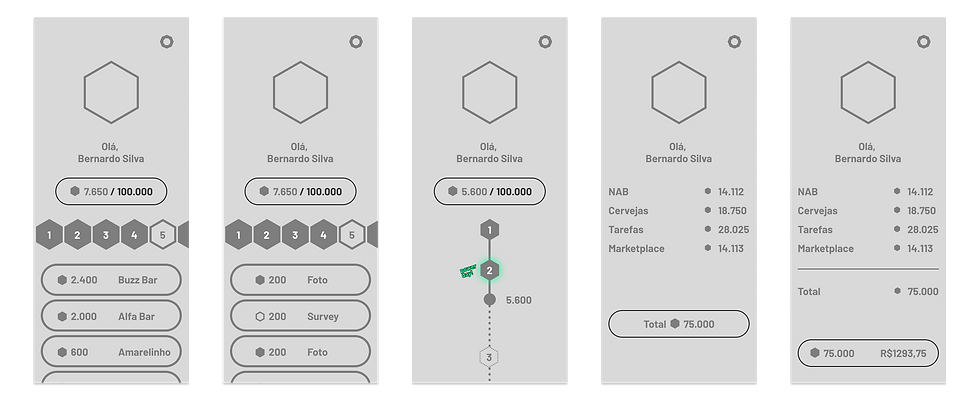
Coins: Finalizing
Over many iterations, the design was refined. The ability to see the previous month's performance was added, different statuses for workdays were added (previous, current, power days, and future), and dialogs were added to explain certain aspects that may not be immediately obvious. Now, in conjunction with the task list elsewhere in the app, BDRs would have an understanding of how well they were progressing on their daily and monthly tasks by checking this screen.

Variable Compensation Wallet: Research and Iteration
For the wallet, the total amount earned would need to be displayed, as well as the composition of key performance indicators that added to it. Various sales and business apps were referenced, and there were long discussions over what type of chart to use.
An early version of the design was tested with users, and they found the visual of a segmented circle chart to be very useful. They liked seeing how each KPI filled the circle at various rates, and found they more clearly understood what affected their pay the most. They also appreciated having the true values of each KPI displayed in their own array of progress bars below.

Variable Compensation Wallet: Finalizing
The full version has the circle chart along with a color coded legend for each KPI (this was checked for color blindness). The 5 most influential KPIs are the displayed while others are grouped into an "other" category. It is also possible to check when the data was last updated. The individual task bars show the actual value of each KPI, and show the weight each has on the total variable compensation. The other category is used here as well, but it can be expanded to show the KPIs included in this value. The previous month can be viewed here as well.
A version showing the monetary value of the variable compensation was also considered, but due to legal issues involved and the chance that the target could move and change value, this version was blocked.
This design was tested with the BDRs, and in general they felt that they had more of sense of progress. In addition to knowing how they were progressing with their goals, they had a better sense of how performing well would benefit them.

Conclusion
This design delivers a feeling of progression as the BDR completes their work. With this interface, the BDR can be more productive in their work by prioritizing tasks with a higher coin value (which are more important, urgent, or critical), and focusing on the KPIs that will have greater influence on their variable compensation. This way, they will become better workers for the company, while also maximizing their own gains. This feature is still in development, but early tests have proved promising.